
How Fieldspace is organized
Updated August 24, 2026
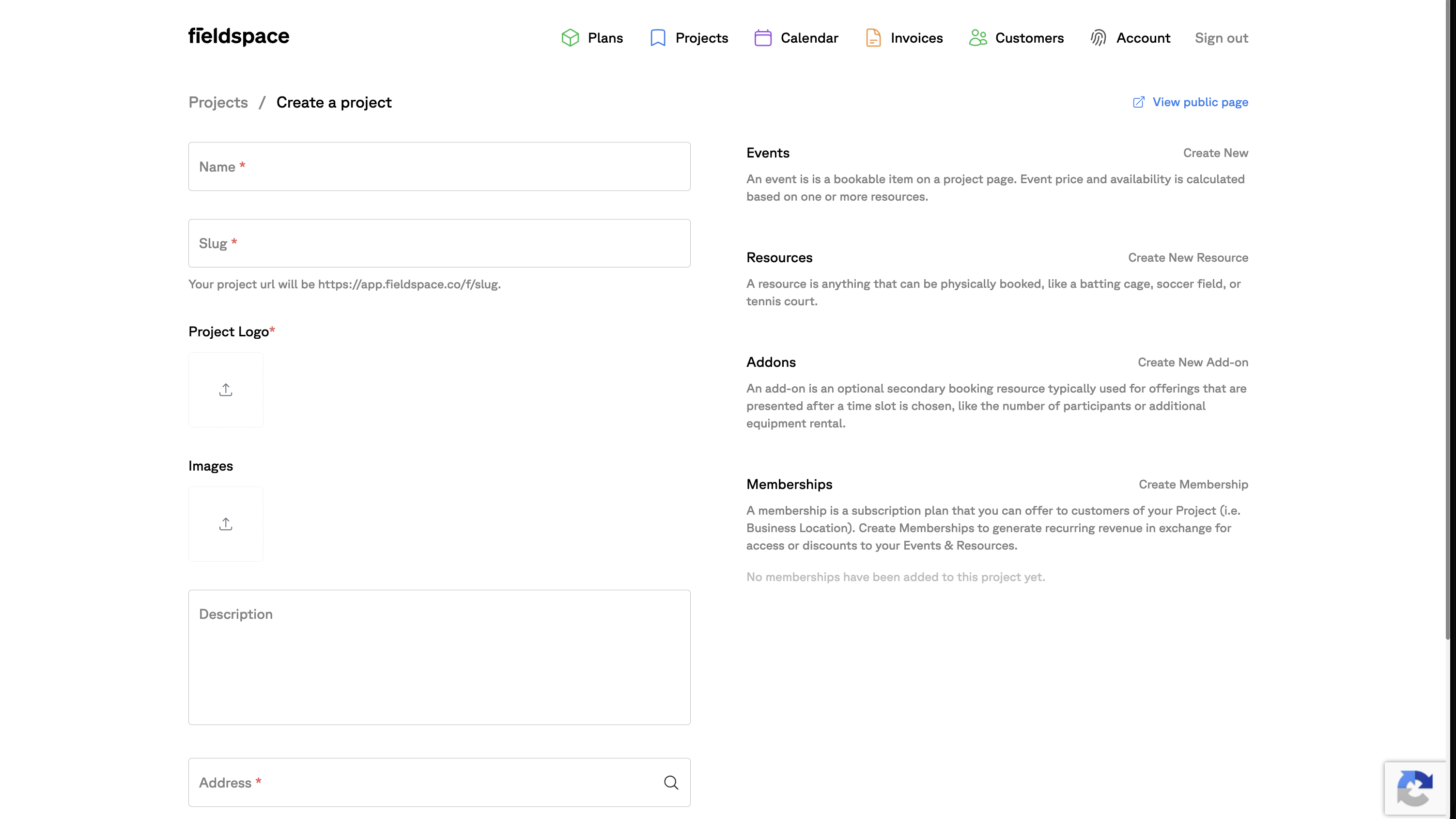
Your courts, cages, lanes, fields, and coaches are Resources — anything only one group can use at a time. What's on your price list is an Event. Every Event is built from one or more Resources. Your facility is a Project, Add-Ons attach to any booking, and Plans and Team Plans cover the customers who come back on a schedule.
Set up what you physically have once, then build as many sellable products on top of it as you like. The short version: Resources are what you have. Events are what you sell.
| Fieldspace term | What it actually is | Real examples |
|---|---|---|
| Project | Your facility — or one of them, if you have several | “Riverside Sports Center,” “Northgate location” |
| Resource | The thing that can only be used by one group at a time | Court 1 · Cage 3 · Lane 4 · Half-field A · Coach Mike |
| Event | What's on your price list — what a customer picks when they book | “Full Court Rental” · “60-Min Hitting Lesson” · “Saturday Skills Clinic” |
| Add-On | The upsell attached to a booking | Pitching machine · Ball machine · Extra 30 minutes · Party host |
| Plan (Membership) | A recurring subscription — turns regulars into predictable monthly revenue, and gives instructors or staff preferred access | “Unlimited Cage Membership” · “Instructor access” |
| Team Plan | Registration and payment for a whole team, with full roster management | “Fall Travel Season” · “12U Tryout” |
Why aren't they the same thing?
Because one space usually gets sold several different ways.
One gym floor might be rented as a full court, split into two half courts, sold as an hour of private instruction, or run as a Saturday clinic. That's four things on your price list sitting on one physical floor.
Separating them means Fieldspace always knows what's actually occupied, no matter which product someone bought. Book the full court, and both half courts disappear from availability on their own. You never maintain that relationship by hand, and you can't accidentally sell the same floor twice.
What counts as a Resource?
Anything only one group can use at a time — including your staff:
- Spaces — courts, fields, cages, lanes, rooms, batting tunnels
- People — instructors and coaches
Coach Mike is a Resource in exactly the same way Cage 3 is. That's what lets a lesson book the coach and the cage together and hold both.
Each Resource carries its own hourly rate, how many bookings it can hold at once, buffer time before and after, and how much advance notice it needs.
What counts as an Event?
An Event is what a customer picks when they book. Three kinds, and the kind changes how booking behaves:
| Kind | What it's for | Example |
|---|---|---|
| Standard | Open time slots the customer chooses | Court rental, cage rental |
| Lessons | Needs a coach plus a space | 60-minute private hitting lesson |
| Clinic | Fixed sessions, set times, capped headcount | Saturday morning skills clinic, 8 spots |
What's an Add-On?
The upsell attached to a booking — pitching machine, ball machine, bucket of balls, extra 30 minutes, party host. Add-Ons have their own price and their own member pricing, and you can cap how many a customer may add.
What's a Plan?
A Plan is a recurring subscription. Instead of a customer paying per booking, they pay on a schedule — which turns your regulars into revenue you can count on before the month starts.
You'll see these called Memberships on the Project screen and Plans in the top navigation. They're the same thing.
Plans also work internally. Putting an instructor or an employee on a Plan is how you give them preferred access, rather than managing their bookings as a special case.
What a Plan grants and how credits work is covered in plans, benefits, and credits.
What's a Team Plan?
A Team Plan handles registration and payment for a whole team at once, rather than chasing individual parents. It covers both ends of the season: a one-time tryout, or a season-long commitment.
Either way you get full roster management, so you know who is actually on the team and who has paid.
The mechanics are in teams and season registration.
A real setup
A baseball training facility with four cages, a turf that splits in half, and two coaches:
Project:    Diamond Sports Academy

Resources:  Cage 1 · Cage 2 · Cage 3 · Cage 4
            Full Turf · Half Turf A · Half Turf B
            Coach Mike · Coach Sara

Events:     30-Minute Cage Rental     → any open cage
            60-Minute Cage Rental     → any open cage
            Private Hitting Lesson    → a coach + an open cage
            Full Turf Rental          → both halves at once
            Half Turf Rental          → either half
            Saturday Hitting Clinic   → Cage 1 + Coach Mike, 8 spots

Add-Ons:    Pitching machine · Bucket of balls · L-screen
Nine Resources, six things to sell. The turf appears in two Events that block each other automatically, and the coaches are Resources just like the cages.
The full walkthrough of this setup, step by step, is at setting up a baseball training facility.
Common questions
Can one court belong to several Events?
Yes, and it usually should. A court can sit in a full-court rental, a half-court rental, and a lessons Event at the same time. Fieldspace stops them from overlapping.
What happens when someone books the full court?
Both half courts become unavailable for that time, automatically, because the full-court Event is defined as needing both.
Do I need a separate Project for each court?
No. A Project is a facility. Individual courts are Resources inside it. You only need more than one Project if you have more than one location.
Are coaches really set up the same way as courts?
Yes. A coach is a Resource. That's how a lesson can hold the coach and the space together, and why Coach Mike can't be double-booked across two lessons.
Can I charge members less?
Yes. Member pricing can be set on Resources, Events, and Add-Ons — as a member rate, a percentage off, or a fixed discount.
What's the difference between a Plan and a Team Plan?
A Plan is a recurring subscription for an individual — a regular customer paying monthly, or an instructor given preferred access. A Team Plan registers and bills a whole team at once, either for a one-time tryout or a full season, and includes roster management.