
Calendar View & Sync
Updated May 2026
Use Fieldspace's built-in calendar to see all your bookings at a glance, and sync to Google Calendar for mobile access.
Overview
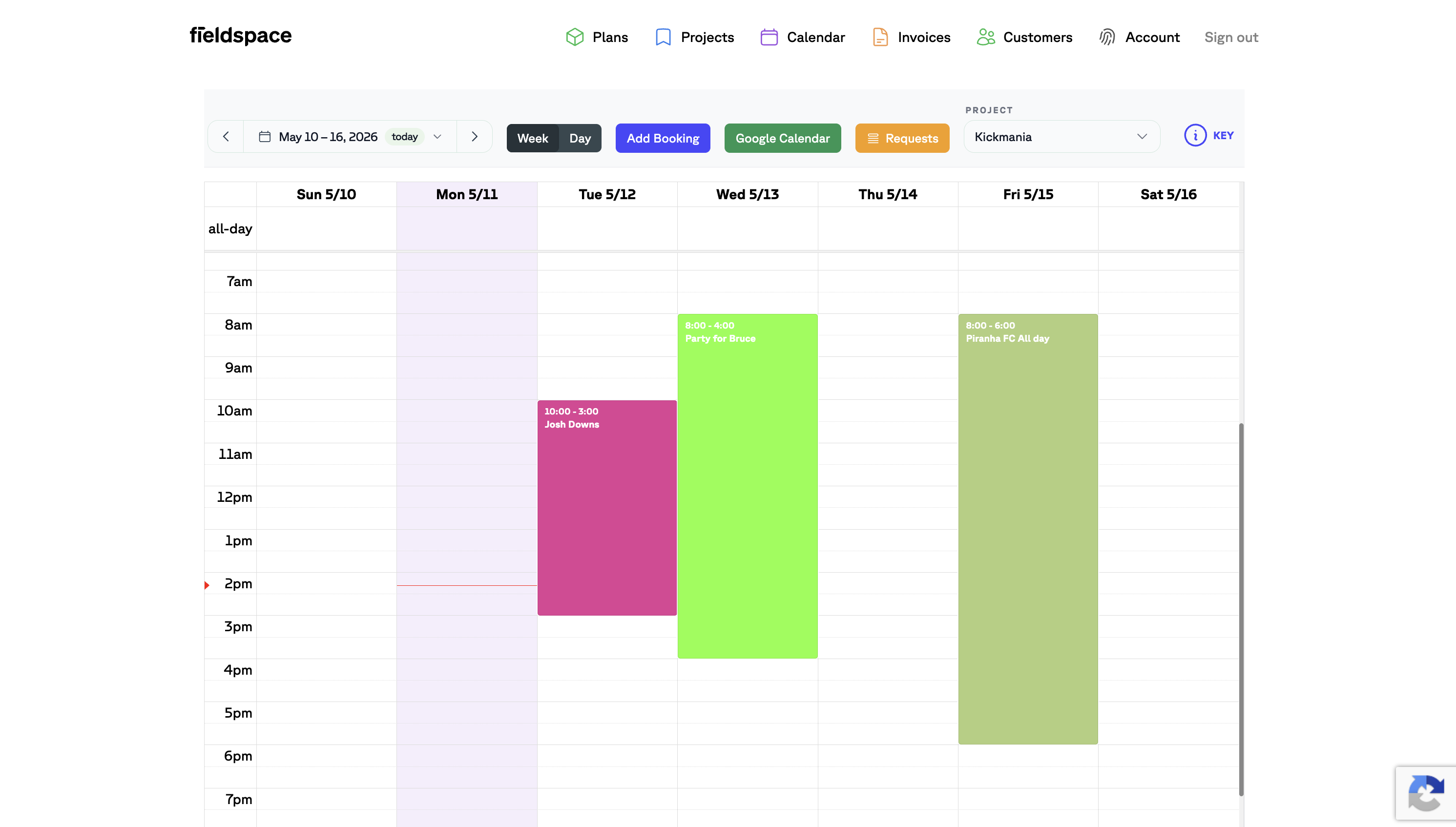
The Fieldspace calendar is your command center for seeing everything that's happening at your facility. Every booking shows up as a color-coded block, making it easy to spot availability, conflicts, and busy periods at a glance.
Calendar Views
Switch between Week and Day views using the toggle at the top of the calendar. Week view is great for planning ahead and seeing the overall schedule. Day view zooms in when you need to manage a busy day or see more detail.
Use the arrow buttons or the date picker to navigate between dates. Click"today" to jump back to the current day.
Filtering by Project
If you manage multiple facilities or programs, use the Project dropdown to filter the calendar. This shows only bookings for that specific project—useful when you're focused on one location or program and don't need to see everything.
Each project can have its own color scheme, so bookings are visually distinct even when viewing all projects together.
Adding Bookings
Click the "Add Booking" button to create a new reservation. You'll select the customer, date, time, and resource (court, field, lane, etc.). The booking appears on the calendar immediately.
For booking requests that come in through your public booking page, click"Requests" to review and approve them. Once approved, they'll show up on the calendar like any other booking.
Tip
Use the KEY button to see a legend of what different colors mean on your calendar—helpful when you have multiple booking types or resources.
Google Calendar Sync
Want to see your Fieldspace bookings on your phone or share them with staff? Connect to Google Calendar and every booking automatically syncs.
Getting set up takes about a minute:
- Click the "Google Calendar" button in your calendar view
- Sign in with your Google account
- Grant Fieldspace permission to add events to your calendar
- Choose which Google Calendar you want bookings to appear in
From then on, every new booking creates an event in Google Calendar automatically. Modifications and cancellations sync too—you don't need to update both places.
Tip
We recommend creating a dedicated calendar in Google called "Fieldspace Bookings" and syncing to that. Keeps your facility schedule separate from personal appointments and makes it easy to share with staff.
What Syncs to Google
Each booking event in Google Calendar includes:
- Event title — The customer's name or group name
- Start and end time — Exactly when the booking runs
- Facility and resource — Which court, field, or lane is booked
- Booking notes — Any special requests or details
- Contact info — Customer email and phone in the event description
Troubleshooting
Bookings not showing up in Google Calendar? Here's what to check:
- Is the integration connected? — Click the Google Calendar button. If it asks you to sign in again, the connection was lost.
- Give it a few minutes — Events don't appear instantly. Wait 2-3 minutes and refresh your Google Calendar.
- Check the right calendar — Make sure you're looking at the calendar you connected, not a different one. Easy to miss if you have several.
- Reconnect if needed — Sometimes Google revokes access after a password change. Click the Google Calendar button to reconnect.
If bookings still aren't syncing after trying these steps, reach out to our support team and we'll help you sort it out.
Note
Looking for Outlook or Apple Calendar support? Currently, Fieldspace only integrates with Google Calendar. We chose to focus on one integration and make it work really well rather than offer half-baked support for multiple calendars.